How to set up "Precise Location" on your mobile device
Unable to see the breadcrumbs of your trip on the job map after completing a job? This usually means the "Precise Location" toggle is turned off in your device's location permissions — this setting lets IronSight access your device's exact location, which is what powers the breadcrumb trail.
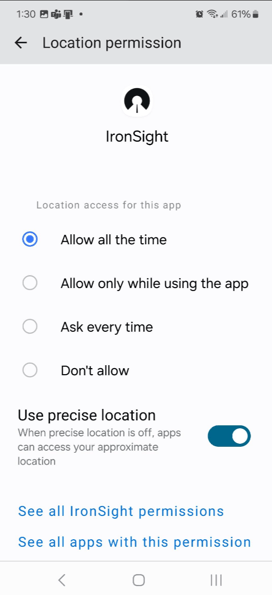
Android Devices:
- Open Settings > Location > App Permissions
- Find and tap IronSight
- Turn on "Use Precise Location"
(see screenshot below)
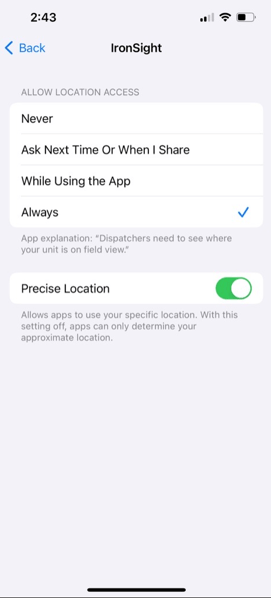
Apple Devices (iOS):
- Open Settings > Privacy & Security > Location Services
- Find and tap IronSight
- Turn on "Precise Location"
(see screenshot below)
Once enabled, breadcrumbs should appear on the job map the next time a job is completed.
Still not showing up? Contact us at [support@ironsight.app] and we'll help you troubleshoot further.